BEAT MAKER · BROWSER DAW
Free Beat Maker:
Make Beats Right
in Your Browser
Amped Studio is a web based beat maker , no download, no install. Program drum patterns, arrange them into a complete track, and add bass and melody on top. Free to start, with no paywall on the core workflow.
Drum Sequencer
SOUND LIBRARY · FULL ARRANGEMENT
Work Online
IN YOUR BROWSER
Drum Sequencer
SOUND LIBRARY · FULL ARRANGEMENT
Work Online
IN YOUR BROWSER
What's different
A free beat maker that
works entirely online
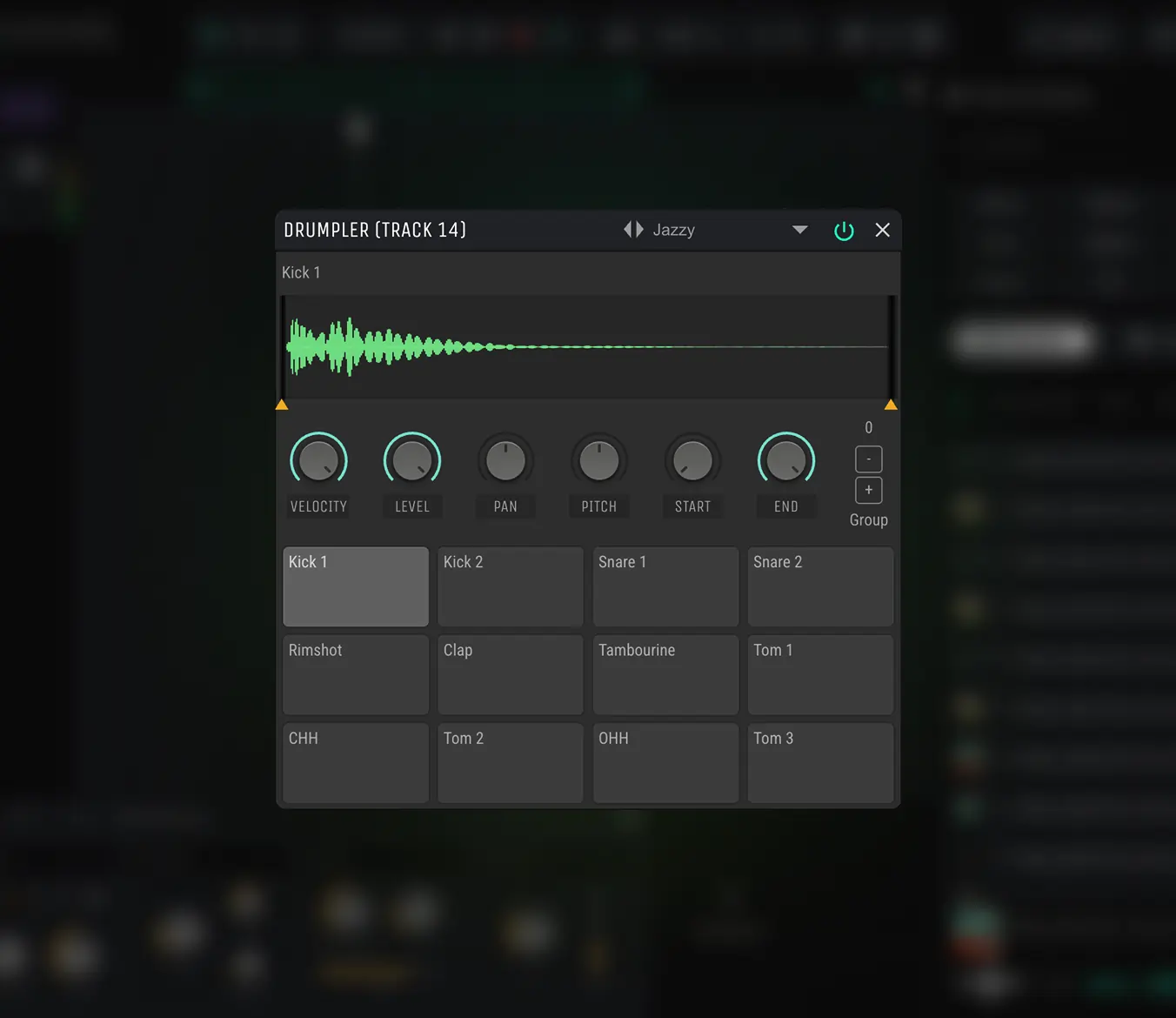
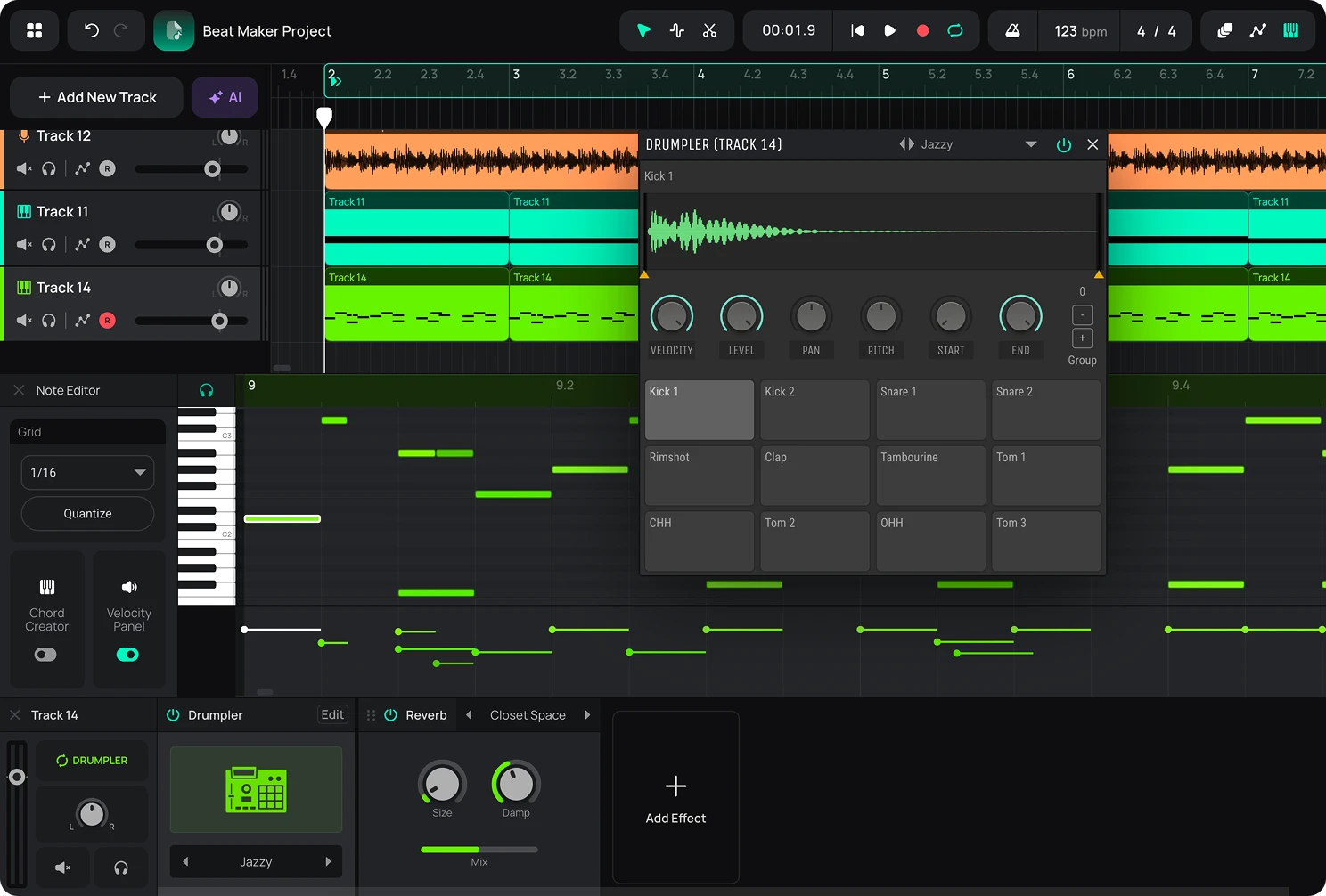
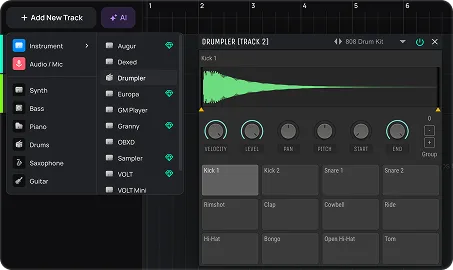
Amped Studio is a beat creator that runs entirely in your browser, no download or install required. Drumpler opens with built-in presets ready to play, or load your own samples and build a kit from scratch. The MIDI editor is where you program the pattern.
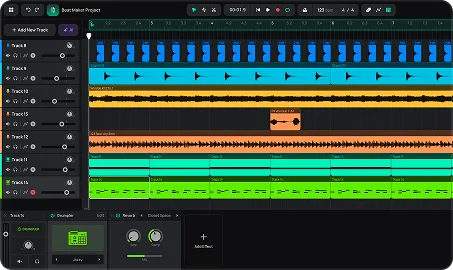
Once you have a loop, the Arrangement Timeline is where you place it, build variations, and structure it into a full track. Building with the included presets is free, no limits on the core workflow. You can also record your own audio or drag in your own samples to build a custom Drumpler kit. On Premium, that material saves with your project for next time.
Everything you need to create a beat online

Use a preset kit, or build your own
Drumpler opens with built-in presets ready to play. Have a sound in mind that the presets don't cover? Drag your own samples onto the pads and build a kit around it (saving it for later is on Premium).

Program a loop, then build a track from it
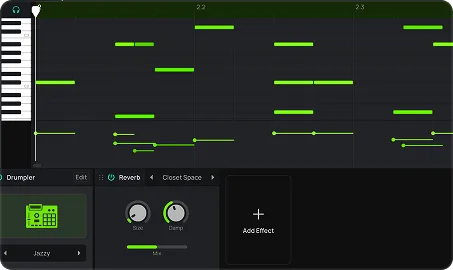
Sequence your drum pattern in the MIDI editor. In the Arrangement Timeline, place that loop, build variations of it, and arrange them in order, so the track moves instead of repeating the same bars.

Not sure where to start?
Try AI Assistant. It generates a multi-track sketch in your chosen genre that you can edit and build on. A different starting point from building with Drumpler, useful when you'd rather react to something than start from zero.
HOW IT WORKS
Make a beat online in four steps
Start with Drumpler and the MIDI editor to create your beat from the ground up, or generate a starting point with AI Assistant if you'd rather edit than build from scratch. Here's the core workflow.
Step 1
Open Amped Studio
Sign in or register — no download, no install. Your session opens in the browser in seconds.
Step 2
Add Drumpler and choose your sounds
Add a Drumpler track, then pick a preset from its built-in dropdown or drag in your own samples.
Step 3
Sequence your pattern
Program your beat in the MIDI editor — kick, snare, hi-hats, percussion, however you want it arranged.
Step 4
Build variations and arrange the track
Take your drum loop and build variations, change a hi-hat pattern, drop the kick out, add a fill. Arrange those variations in order to create movement across the track, then layer in bass and melody on separate tracks.
WHAT'S INCLUDED
Start free. Add more when you're ready.
The free plan gives you everything you need to start. Premium adds more instruments, more effects, and a way to save your own material with the project.
What you get for
FREE
- Drumpler for drums, plus the Dexed, OBXD, VOLT Mini, and GM Player synths
- Delay, Reverb, and a set of drive and amp effects
- Full MIDI editing, from a single clip to the whole arrangement
- Up to 5 projects, 16 tracks per project
Recommended
Premium unlocks
✓ More synths with different types of synthesis, and the Sampler
✓ EQ, dynamics (Compressor, Gate, Limiter), and modulation effects (Chorus, Flanger, Phaser)
✓ Save your own samples, recordings, and custom Drumpler kits with your project
✓ Unlimited projects and tracks
✓ Unlimited AI Assistant generations (with Premium + AI)
FAQ
Just getting started? Get clear answers to start creating music online.
Is Amped Studio's beat maker free?
Yes. Programming drums, sequencing patterns, and arranging a full track is free, with no install required. Saving your own samples, recordings, or custom drum kits into the project requires a Premium plan.
Do I need to download anything to use it?
No. Amped Studio runs entirely in your browser. Open it, sign in, and start building a beat right away.
Can I make a full song, or just a loop?
Both, it's up to you. The MIDI editor builds patterns at the loop level. The Arrangement Timeline takes those patterns further, structuring builds and breakdowns into a complete track if that's the goal.
Can I use my own samples?
Yes. Drag your own samples onto Drumpler's pads to build a custom kit, free to use in your session. Saving that kit for later requires Premium.
Is this beat production software, or do I need to install something separate?
No installation needed. Amped Studio is browser based beat production software you open and use directly, with no separate program to download.
Can I create music beats online without paying anything upfront?
Yes. You can create music beats online on the free plan with no payment required to start. Premium adds more synths, effects, and the ability to save your own material with the project.
Not sure where to start?
Try AI Assistant. It generates a multi-track sketch in your chosen genre that you can edit and build on. A different starting point from building with Drumpler, useful when you'd rather react to something than start from zero.

LET'S TRY
Make Music Now.
No Downloads,
Just Your Browser.
Record vocals, make beats, build chord progressions, try AI tools and arrange tracks in a smart MIDI editor — right in your browser.